
Speculation Rules API: Instant Page Navigation in Magento 2
Speculation Rules API enables browsers to prerender pages in the background before user clicks on a link. This makes navigation between pages nearly instant. This article shows how we implemented Speculation Rules on a Magento 2 store and the real performance improvements achieved.
How It Works
When user loads a page, the browser reads Speculation Rules and starts prerendering specified pages in the background. When user clicks a link to a prerendered page, the browser instantly activates it instead of loading from scratch.
Video: Before and After
These videos demonstrate the difference in navigation speed with and without Speculation Rules:
Before: Standard navigation
After: With Speculation Rules prerender
Implementation
Speculation Rules are added as a JSON script in the <head> section:
<script type="speculationrules">
{
  "prerender": [
    {
      "source": "document",
      "where": {
        "and": [
          {"href_matches": [
            "/what-is-new.html", "/gear.html", "/training.html",
            "/women.html", "/men.html", "/sale.html",
            "/gift-cards.html"
          ]}
        ]
      },
      "eagerness": "eager"
    }
  ],
    "prefetch": [
    {
      "source": "document",
      "where": {
        "and": [
          {"href_matches": [
            "/*.html"
          ]},
          {"not": {"href_matches": [
            "/what-is-new.html", "/gear.html", "/training.html",
            "/women.html", "/men.html", "/sale.html",
            "/gift-cards.html"
          ]}}
        ]
      },
      "eagerness": "moderate"
    }
  ]
}
</script>Verification in DevTools
Chrome DevTools shows active Speculation Rules and prerendered pages:
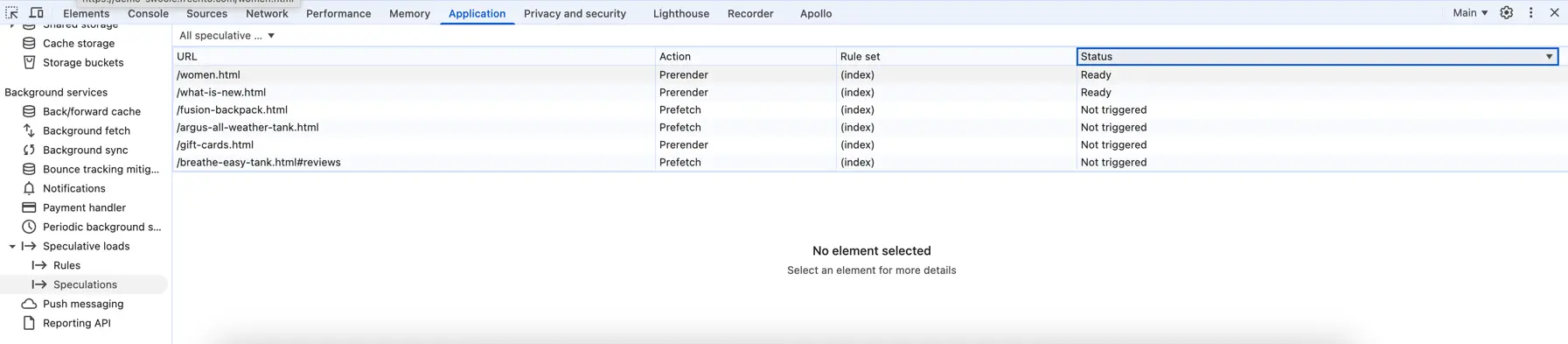
Application panel → Speculative loads shows prerendered URLs
To verify Speculation Rules are working:
- Open Chrome DevTools (F12)
- Go to Application panel
- Find Speculative loads in the sidebar
- Hover over links on your page to trigger prerendering
- See prerendered URLs appear with status "Ready" or "Success"
Performance Results
Navigation time from homepage to category page:
| Scenario | Navigation Time |
|---|---|
| Without Speculation Rules | 800-1200ms |
| With Speculation Rules (prerender) | 30-80ms |
This is approximately 10-20x faster navigation. The page appears instantly because it was already fully rendered in the background.
Browser Support
| Browser | Support |
|---|---|
| Chrome 121+ | Full Support |
| Edge 121+ | Full Support |
| Firefox | No Support |
| Safari | No Support |
Unsupported browsers simply ignore the <script type="speculationrules"> tag and load pages normally. No negative impact.
Hidden Bonus: Full Page Cache Warming
There's an important, often overlooked benefit of Speculation Rules for Magento 2 — they effectively warm up the Full Page Cache.
When a user's browser prerenders a page, that page gets stored in the Full Page Cache (Varnish). Even if this particular user never actually visits that page, any other user who navigates to it will receive an instant response from the cache. This creates a "cache warming" effect where active users help prepare the cache for other visitors.
Server Load Considerations
Prerendering increases server requests because pages are loaded before user actually needs them. To minimize impact:
- Use
eagerness: moderateinstead ofeager— only prerenders on hover - Limit prerendering to high-value pages (categories, popular products)
- Ensure Varnish/Full Page Cache is working properly — prerendered pages should be served from cache
- Monitor server load after implementation
- Verify your Full Page Cache effectiveness before enabling aggressive prerendering — we use our Freento Full Page Cache Analyzer module for this purpose
Summary
Speculation Rules API is a simple way to dramatically improve navigation speed on Magento 2 stores. It provides instant results for Chrome/Edge users (typically 60-70% of traffic).
We can analyze your store's navigation patterns and implement optimal Speculation Rules configuration.